

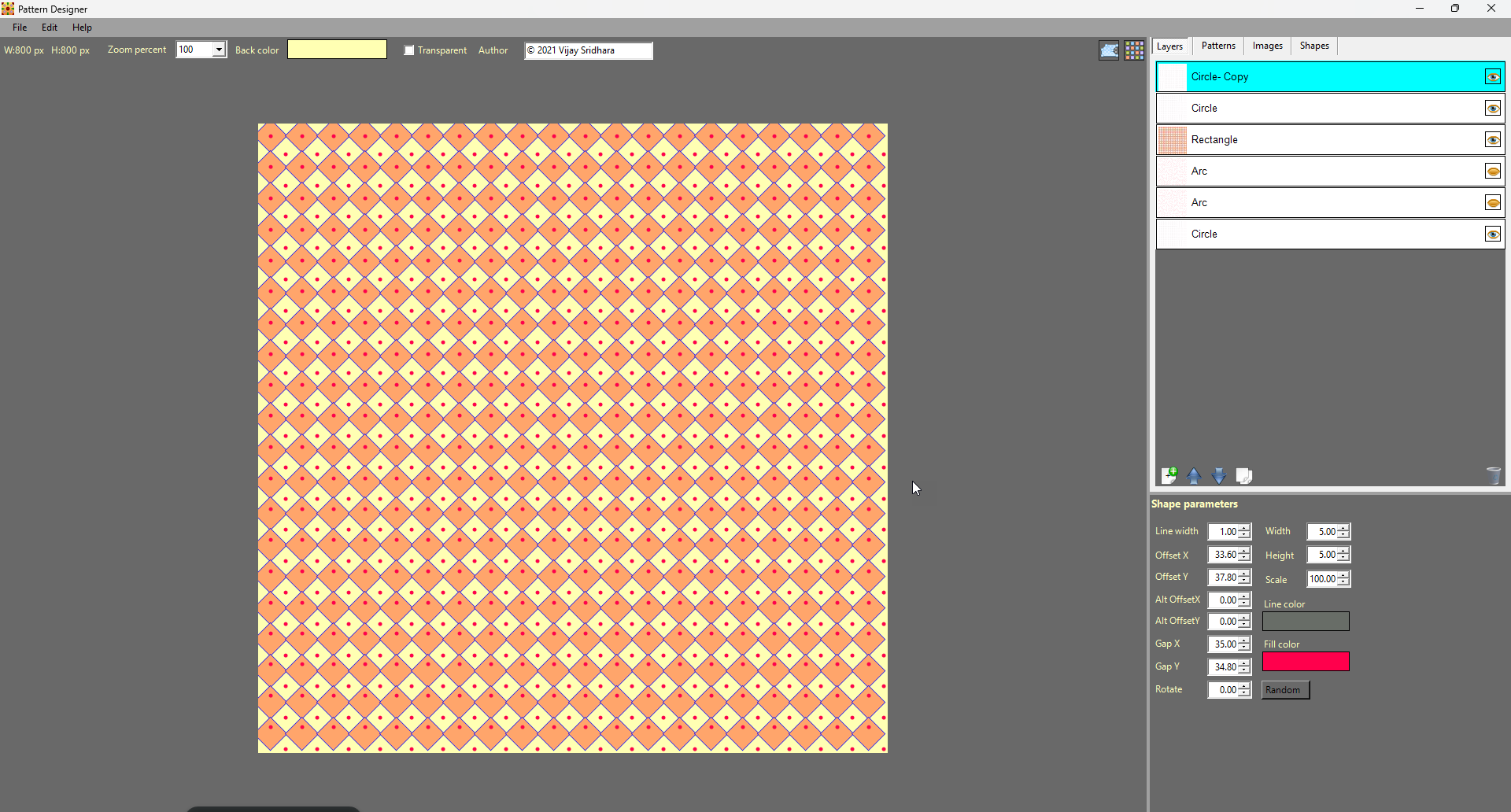


Description
Download Pattern Designer – pattern design, floral patterns, seamless patterns, 2D design, creative tool, art app
Overview
Pattern Designer is a specialized mobile application crafted for artists and creatives seeking a streamlined, intuitive platform to develop vibrant 2D patterns. The app is designed to support users in creating intricate designs for digital and print media, with a strong focus on versatility and creative exploration. By offering scalable dimensions ranging from 100x100px to 2048x2048px, it accommodates both small-scale projects and large-format artwork, making it suitable for a wide range of applications such as textile design, digital wallpapers, and graphic illustrations. The app’s core functionality centers on empowering users to generate seamless repeating patterns, a critical need in design workflows where continuity and precision are essential.
Target users include digital artists, graphic designers, crafters, and hobbyists interested in pattern creation. The inclusion of a growing library of floral images provides immediate access to natural, visually rich elements that can be incorporated into designs, enhancing inspiration and reducing setup time. The app also fosters community engagement through shared patterns, enabling users to both contribute and access free designs from others—an aspect that strengthens its role within the creative ecosystem. While the developer did not provide additional background details, the app’s structure suggests a focus on accessibility and user-driven creativity. Its presence in the productivity category reflects its utility as a tool for structured artistic workflows, supporting both rapid prototyping and refined design output.
Key Features & Functionality
- Flexible Dimension Support: Design patterns in sizes from 100x100px to 2048x2048px, allowing adaptation to various project needs, from mobile app icons to large-scale fabric prints.
- Expanding Floral Image Library: Access a continuously growing collection of floral motifs that can be directly integrated into patterns, offering natural and aesthetically pleasing design elements.
- Seamless Editor: Create patterns that repeat without visible seams, ensuring smooth continuity—essential for wallpapers, textiles, and background designs.
- Shape Maker Tool: Rapidly generate custom shapes to incorporate unique visual elements, enabling experimentation and faster iteration during the creative process.
- Community-Driven Pattern Sharing: Share your designs and download free patterns from other users, fostering collaboration and expanding creative possibilities through collective input.
Each feature is tailored to address real-world design challenges. For instance, the seamless editor helps prevent visible breaks in repeated patterns, a common issue when designing for fabric or UI backgrounds. The Shape Maker tool accelerates the process of building original design components, reducing reliance on external vector software. The floral library serves as a ready-made resource for users seeking organic, nature-inspired patterns—ideal for fashion, stationery, or home decor projects. Community sharing transforms the app from a solitary tool into a collaborative platform, where users can draw inspiration, receive feedback, and expand their creative toolkit through peer contributions. These features collectively support a dynamic, iterative design process, making Pattern Designer a practical solution for both beginners and experienced artists.
Interface, UX & Performance
The user interface of Pattern Designer appears to prioritize clarity and accessibility, with a layout designed to guide users through the pattern creation workflow. The app’s visual style emphasizes clean lines and intuitive controls, minimizing clutter and allowing users to focus on design. Navigation is structured around three core tools—Pattern Designer, Seamless Editor, and Shape Maker—each accessible via a central menu, suggesting a logical workflow progression. The app’s responsiveness is expected to be consistent across device categories, though the developer did not specify performance benchmarks or optimization details. However, the app’s file size of 45.3 MB suggests a lightweight design, which may contribute to efficient loading times and smooth operation on mid-range devices.
Although the developer did not list formal performance metrics, the app’s modular toolset implies optimized functionality, with each component operating independently to reduce system strain. Stability during extended design sessions is likely supported by efficient memory management, particularly given the app’s focus on 2D pattern creation rather than high-end rendering. Users can expect minimal lag when switching between tools or adjusting pattern dimensions. The interface appears to be touch-optimized, with controls sized appropriately for finger interaction, reducing the risk of accidental inputs. Overall, the app balances visual appeal with functional efficiency, offering a user experience that supports both creative flow and precision.
Platform Compatibility & Technical Requirements
Pattern Designer is available exclusively on the Android platform, with a current version of 1.0.1. The app has a file size of 45.3 MB, which is relatively compact for a creative tool, indicating efficient code structure and minimal bloat. The developer did not specify minimum OS requirements or hardware specifications, so compatibility with older Android devices cannot be confirmed. However, the app’s lightweight footprint suggests it may function well on a broad range of Android devices, including those with modest processing power and storage capacity. Users should verify compatibility with their device’s Android version before installation, as no official compatibility list was provided.
Updates are expected to maintain functionality and introduce new features, such as expanded pattern libraries or enhanced editing tools. The app is currently free to download and use, with no in-app purchases or ads mentioned in the provided information. This pricing model supports accessibility for a wider audience, including students, independent artists, and hobbyists. The absence of monetization details does not indicate instability—rather, it suggests a focus on user experience and community growth. As the app evolves, future updates may include additional tools or platform expansions, though no such plans were disclosed.
Pros and Cons
Pros
- Offers flexible pattern dimensions from 100x100px to 2048x2048px for diverse project needs.
- Includes a growing library of floral images to inspire and enrich design work.
- Seamless Editor ensures clean, repeatable patterns without visible borders.
- Shape Maker enables rapid creation of custom design elements.
- Community sharing fosters collaboration and access to free user-generated patterns.
- Free to download and use, with no visible ads or in-app purchases.
Cons
- Specific OS requirements were not listed, limiting clarity on device compatibility.
- Performance on older or low-end Android devices is unverified.
- Developer background and company details were not disclosed.
- Community features may vary in content quality without moderation.
- No information on update frequency or long-term development roadmap.
FAQ
Is Pattern Designer available for iOS?
As of the current release, the app is only available on Android. There is no information regarding future iOS availability.
Can I use Pattern Designer for commercial projects?
The app allows users to create and export patterns for various purposes. However, the licensing terms for exported designs or community-shared content were not specified.
Is the app free to use forever?
Yes, the app is currently free to download and use. No subscription or in-app purchase details were provided.
How often are new patterns added to the community library?
The developer did not disclose the update frequency for the community-shared pattern library.
Do I need an internet connection to use the app?
While some features like community sharing require connectivity, core tools such as pattern creation and editing can likely be used offline.
Final Thoughts + CTA
Pattern Designer stands out as a focused, user-friendly tool for artists and creatives who need a reliable solution for 2D pattern creation. Its combination of scalable dimensions, a growing floral library, and integrated tools like the Seamless Editor and Shape Maker makes it a practical choice for both quick sketches and detailed designs. The inclusion of community sharing adds a collaborative dimension, transforming the app into more than just a utility—it becomes a creative network. While some technical and developmental details remain unspecified, the app’s lightweight design, free access, and clear functionality suggest strong potential for long-term use.
Artists, designers, and hobbyists looking to explore pattern-making on mobile devices will find significant value in this app. Whether you're designing for digital media, textiles, or personal projects, Pattern Designer delivers a smooth, intuitive experience. With its emphasis on creativity, flexibility, and accessibility, it fills a niche in the mobile productivity space. Download Pattern Designer now
Guides & Tutorials for Pattern Designer
How to install Pattern Designer
- Click the Preview / Download button above.
- Once redirected, accept the terms and click Install.
- Wait for the Pattern Designer download to finish on your device.
How to use Pattern Designer
This software is primarily used for its core features described above. Open the app after installation to explore its capabilities.
User Reviews for Pattern Designer 0
No reviews found


